.png?width=200&height=100&name=FJ%20white%20colour%20(400%20x%20200%20px).png)
Two new report pages give you a complete list of every downtime and uptime instance recorded across your organisation. Filter, sort, and download the data you need without any manual digging.
Watch - How to use the Uptime and Downtime Reports
Downtime Report
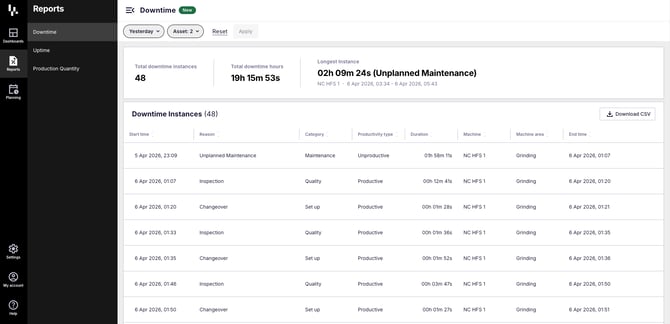
Find the Downtime Report under Reports in the left-hand navigation.
At the top of the page you'll see a summary of your current view: total downtime instances, total downtime hours, and your longest single instance. These update as you change your filters, so you always know what you're looking at before diving into the table.
You can sort by any column — click the column header to sort ascending or descending.
Uptime Report
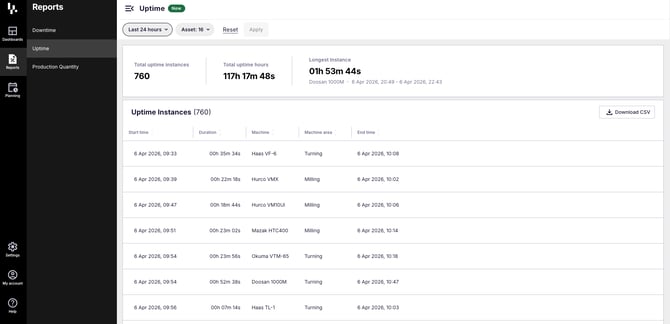
The Uptime Report works in exactly the same way, accessible via Reports > Uptime.
The summary bar shows total uptime instances, total uptime hours, and the longest uptime instance in your current filter. The table columns are similar, focusing on start time, duration, machine, machine area, and end time.
Filtering your data
Both pages can be filtered by time range and asset. The asset filter lets you select individual machines or whole machine areas, so you can easily narrow down to the data that's relevant.
Once you've made your selections, hit Apply to update the table and summary stats.
More advanced filtering is on the way, including shifts, downtime reason, and productive vs unproductive classification.
Downloading your data
Use the Download CSV button in the top-right of the table to export your data. The export reflects exactly what's on screen — your active filters are applied, so you get a clean, focused dataset ready to use in Excel or any other tool.
Got questions?
Don't hesitate to get in touch with our friendly support team by emailing support@fourjaw.com