.png?width=200&height=100&name=FJ%20white%20colour%20(400%20x%20200%20px).png)
If one of your machines has stopped sending data to the FourJaw platform, this may be caused by a disconnected SensorBox.
What does the SensorBox do?
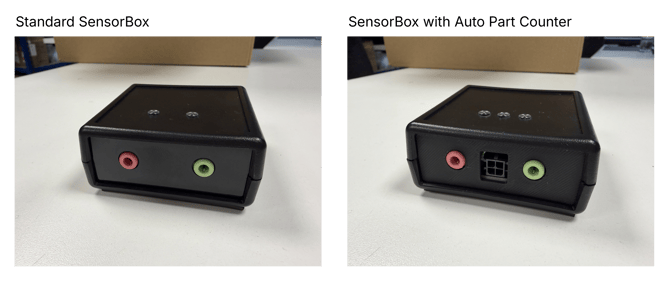
The SensorBox is the small black box that connects your machine's Current Clamps to the MachineLink.
The Current Clamps measure the electrical current being drawn by your machine. They plug into the SensorBox, which collects these readings and sends them to the MachineLink via USB.
The MachineLink then securely sends this data to the FourJaw platform.
If the SensorBox becomes disconnected, FourJaw will no longer receive the raw current data from your machine. As a result, you may notice that machine data is missing from the platform.
Before you begin
Some SensorBoxes and Current Clamps may be installed inside your machine's electrical cabinet.
Important: Working inside a machine electrical cabinet can be dangerous. If accessing the SensorBox or Current Clamps requires opening the electrical cabinet, this should only be carried out by a competent person who is authorised and able to work safely on the equipment.
Always follow your organisation's electrical safety and isolation procedures.
How to check your SensorBox connection
1. Check the SensorBox to MachineLink connection
Locate the USB cable running from the SensorBox to the MachineLink.
Check that:
-
The USB cable is securely connected to the SensorBox.
-
The other end of the USB cable is securely connected to one of the USB ports on the MachineLink.
-
The cable has not become loose, damaged or unplugged.
If a connection appears loose, securely reconnect it.
2. Check the Current Clamp connections
If it is safe to do so and you are authorised to access the electrical cabinet, check that the Current Clamps are securely connected to the SensorBox. There are two Current Clamp connections on the SensorBox:
-
GREEN – Main Supply Current Clamp
-
PINK – Secondary Current Clamp
Ensure both required connections are fully inserted and have not become loose.
3. Check that the MachineLink is powered
Check that the MachineLink itself is switched on and receiving power.
If the MachineLink has also lost power, restoring the SensorBox connection alone will not allow data to reach the FourJaw platform.
Once everything is reconnected
Once you have checked the connections, run the machine normally for a short period so that the SensorBox can begin collecting current readings again. Next, please contact the FourJaw Support team and let us know that the connections have been checked.
The support team can review the machine remotely and confirm whether data is being received correctly by the FourJaw platform again.
When contacting us, please include the name of the affected machine to help us investigate as quickly as possible.
Still not seeing data?
If everything appears to be connected correctly but your machine is still not sending data, please contact FourJaw Support. Email: support@fourjaw.com
Our team can review the connection and help identify the next troubleshooting steps.