.png?width=200&height=100&name=FJ%20white%20colour%20(400%20x%20200%20px).png)
Shifts
Production Planning enables managers and production planners to schedule and manage shift hours for each factory machine. The page features a calendar-based view, allowing you to navigate to any specific date and make shift adjustments as needed, whether for regular schedules or one-off changes such as overtime or public holidays.
Shifts are fully customisable, you can define shift categories, set working hours, and configure recurring schedules to match your factory's operations.
.png?width=670&height=377&name=1%20(1).png)
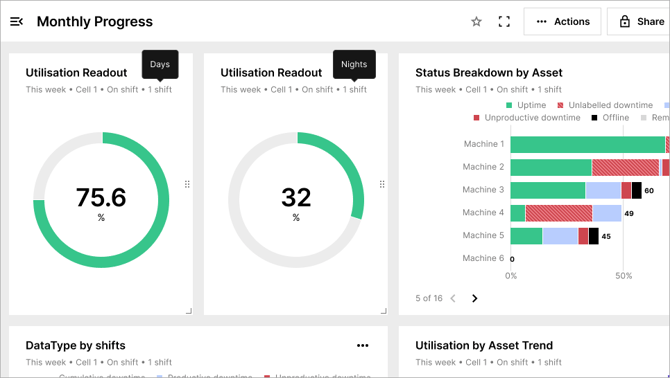
Once shifts are configured, the data becomes available as a filter on your Dashboard and Reports, allowing your team to view machine performance broken down by shift across each working period.
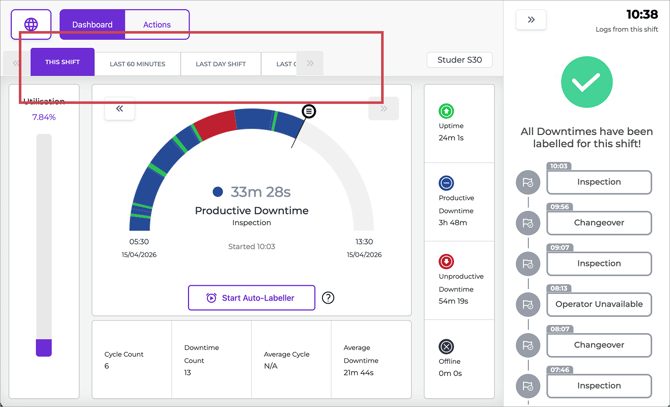
Note: To ensure changes are applied in time on tablets, updates must be made at least 15 minutes before the shift starts. Changes made after this window will not be reflected on the tablets
Key benefits
-
Calendar-based shift management — Navigate to any date to create, adjust, or review shifts, making it easy to plan ahead or handle special scheduling needs.
- Flexible one-off adjustments — Need to skip a bank holiday but keep your Monday–Friday pattern intact? Simply delete the shift for that specific date. Your regular recurring schedule will remain unchanged.
- Shift-based data visibility — Filter machine data by shift on the Dashboard and Reports to monitor and compare performance across different working periods.
- Sync to machine tablets — Shift updates are pushed to the tablet connected to each machine, keeping operators informed at all times.
Planned production time
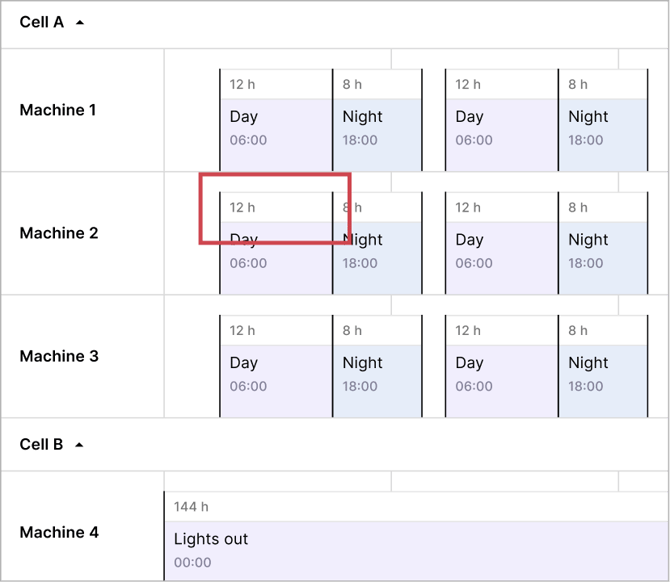
On the Production Planning page, you will notice a white block at the top of each shift schedule. This represents the Planned Production Time, the hours during which the machine is expected to run.
By default, Planned Production Time is set to match your configured shift hours. If you’d like to manage them separately, please email support@fourjaw.com
The future of Production Planning on FourJaw
In a future update, you will be able to set Planned Production Time independently from your shift hours. You will also be able to pre-plan downtime events — such as scheduled maintenance, deep cleaning, or known stoppages.
Read our guide articles:
Got questions?
Get in touch with our support team at support@fourjaw.com