.png?width=200&height=100&name=FJ%20white%20colour%20(400%20x%20200%20px).png)
Tracking your Availability and Quality
OEE is made up of three components: Availability, Performance, and Quality.
FourJaw currently helps you monitor two of them, Availability and Quality, giving you a clear, data-driven view of how your machines are performing and where your biggest losses are happening. (Performance coming soon).
This article walks you through exactly how to do it.
Availability %
Availability measures how much of your planned production time your machine was actually running. Any time your machine is stopped during a planned shift counts as an Availability loss.
A score of 100% means your machine ran continuously throughout its planned production time, e.g. no stops at all.
Formula: Availability = (Uptime ÷ Planned Production Time) × 100
Example: If a machine has 3.5 hours of planned production time, and was actually running for 2.5 hours, Availability = (2.5 ÷ 3.5) × 100 = 71.43%
Any downtime during Planned Production Time counts as an Availability loss, whether it's a necessary part of production or not.
Where to find it: Uptime (Availability) widgets
FourJaw tracks Availability through three Uptime widgets, which you can add to any dashboard. Open the widget library and look under the Uptime section.
The widget library groups all three Uptime widgets together — each one gives you a different view of your Availability data.
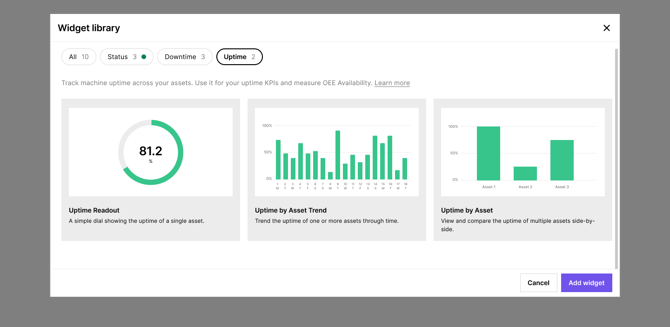
Configure each widget with the date range and shift that matters to you and choose whether to display Availability as a percentage or as hours
Uptime Readout
A simple dial showing the uptime percentage for a single machine. Use this on a dedicated machine dashboard so operators can see their Availability at a glance throughout the shift.
Uptime by Asset Trend
Shows how uptime has changed over time for one or more machines. Use this to track whether your Availability is improving week on week, and to spot patterns — for example, whether a particular day or shift consistently underperforms.
Uptime by Asset
Compares uptime side-by-side across multiple machines. Use this to quickly identify which machines have the lowest Availability so you know where to focus your improvement efforts.
How to configure your Uptime widget
Each Uptime widget can be filtered by date range, shift, and display format. Click the three-dot menu on any widget and select Edit widget to open the configuration panel.
Key settings to consider:
- Date range — set to "Today", "Last 7 days", or a custom range depending on the view you need
- Shifts — filter to "On shift" only so your Availability score only counts time your machine was planned to be running
- Value format — choose "As a percentage" for an OEE-style Availability score, or "As hours" to see raw uptime and downtime hours.
Improving your Availability score
To improve Availability, you first need to understand what's causing your downtime. That's where the Operator Tablet comes in.
When a machine stops, operators can log the downtime reason directly from the tablet by their machines. Every labelled downtime gives you accurate data on your Availability losses — which reasons are most frequent, how long they last, and which machines are most affected.

Theoperator interface shows the current downtime, its duration, and previously logged reasons, making it easy to label stops as they happen
The more consistently downtime is labelled, the more useful your Availability data becomes. Aim for all downtimes labelled before the end of each shift.
Performance* %
*Performance is not currently measured in FourJaw
Performance measures how fast your machine runs compared to its ideal cycle time.
Formula: Performance = (Ideal Cycle Time × Total Parts Produced ÷ Total Time) × 100
Example: 1.8 × 10 ÷ 20 = 0.9 × 100 = 90%
Quality
Quality measures what proportion of the parts your machines produce are good, not scrapped or reworked. A score of 100% means every part produced was a good part.
Formula: Quality = (Total Good Parts ÷ Total Parts Produced) × 100
Example: 1638 ÷ 1788 = 0.916 × 100 = 91.6%
Where to find it: Production Quantity Report
FourJaw tracks Quality through the Production Quantity Report, found in the Reports section of the left-hand navigation.
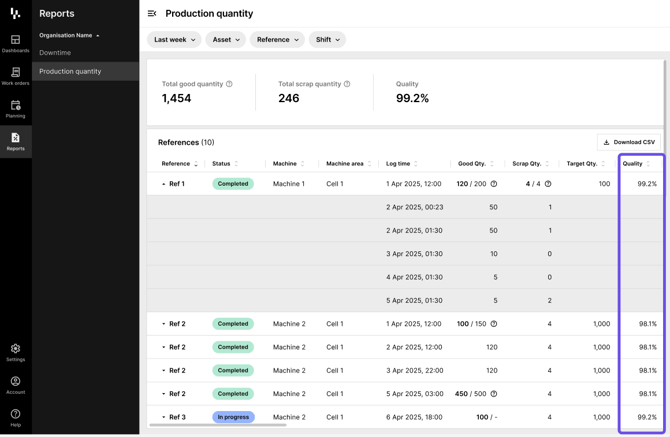
The Production Quantity report shows total good quantity, scrap quantity, and quality percentage — broken down by job reference, machine, and machine area
The report shows you:
- Total good quantity — the number of parts that passed quality checks
- Total scrap quantity — the number of parts that were rejected
- Quality % — your Quality component for OEE, calculated automatically
- A breakdown by job Reference, Machine, and Machine area, so you can see exactly where quality losses are occurring
Use the Download CSV button to export the data for further analysis or to share with your team.